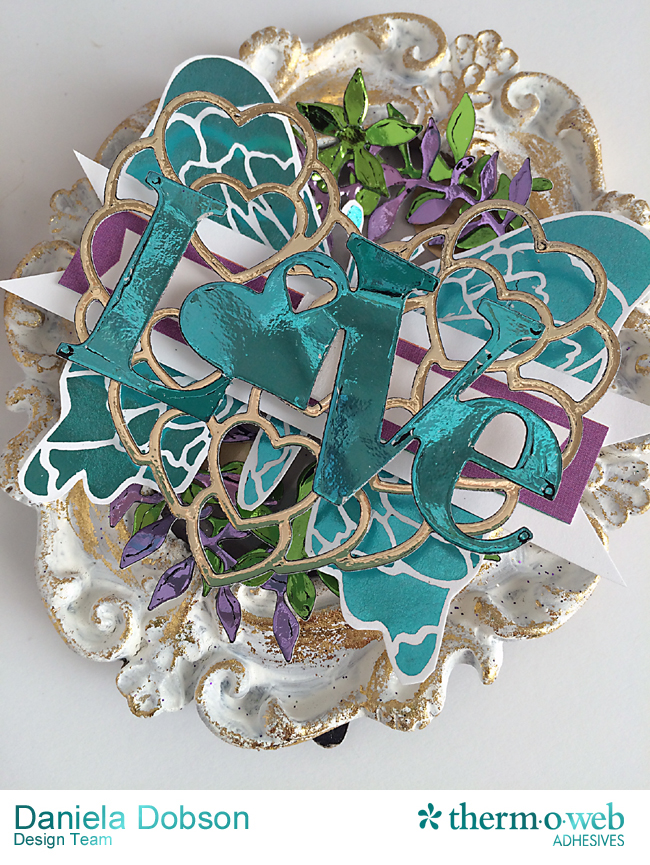
 Love frame
 by
Daniela Dobson
Therm O Web supplies:
Therm O Web 3D White Foam Squares Combo Pack
Therm O Web iCraft Adhesive™ Tape 1/4 in
Therm O Web iCraft Adhesive™ Tape 1/2 in
Therm O Web Zots™ Medium Therm O Web Zots™ Medium
Therm O Web iCraft® DecoFoil™ PeelnStick Toner Sheets–NEW
Therm O Web iCraft® DecoFoil™ – Aqua – NEW Coming Soon!!
Therm O Web iCraft® DecoFoil™ – Champagne - NEW Coming Soon!!
Therm O Web iCraft® DecoFoil™ – Lilac - NEW Coming Soon!!
Therm O Web iCraft® DecoFoil™ – Spring Green - NEW Coming Soon!!
Therm O Web iCraft® Deco Foil™ Liquid Adhesive 2.1oz
Therm O Web iCraft® Deco Foil™ Transfer Sheets Gold
12″ Foil Laminator
Other Supplies:
Frame
Elle’s Studio tag
White cardstock
Impression Obsession butterfly image and dies
HP Laserjet printer
Instructions:
Turn on laminator and let it warm up.
1. Apply
Therm O Web iCraft® Deco Foil™ Transfer Adhesive 2.1OZ around the edges of the frame with a makeup sponge, and let dry. Apply
Therm O Web iCraft® Deco Foil™ Transfer Sheets Gold
2. Print butterfly image using Laserjet printer. Die cut all the items needed for the project from PeelnStick Toner Sheet ("love", heart, wreath branches and flowers). Run each die cut with coordinating Deco Foil, including the printed butterfly, through the laminator.
3. Adhere all the die cut and foiled elements as shown in the photo starting with the wreaths in Lilac and Spring Green by removing the protective backing. Cut the butterfly out and adhere it to the center of the frame using
Therm O Web 3D White Foam Squares Combo Pack.
4. Cut a banner from white cardstock and adhere it to the butterfly using
Therm O Web iCraft Adhesive™ Tape 1/2 in following by the tag using
Therm O Web iCraft Adhesive™ Tape 1/4 in. Adhere the heart and the "love" as shown.